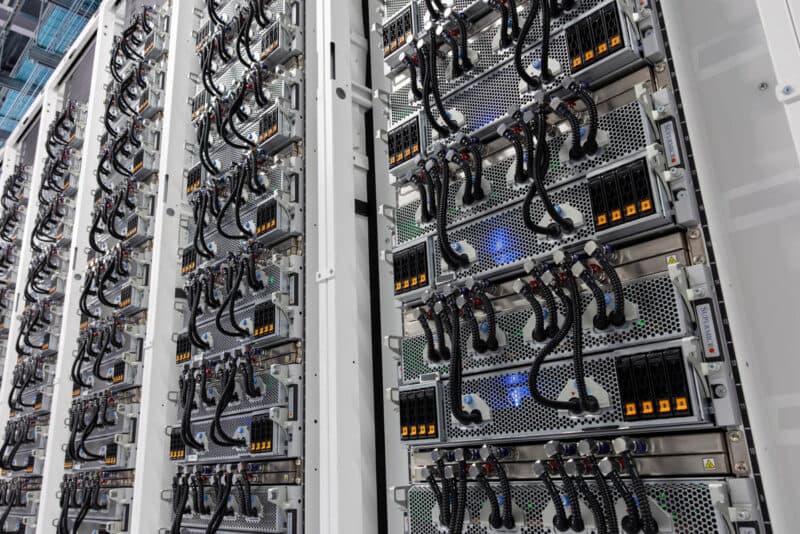
Teams often spend weeks evaluating GPUs and almost no time evaluating the electrical envelope around them. Then the hardware shows up and the deployment stalls because the rack has the wrong circuits, the PDU is undersized, or the cooling design assumed a much lower sustained load.
This guide is for the search intents that show up right before a purchase:
- GPU server power requirements
- how much power does an 8 GPU server use
- what PDU do I need for an H100 server
- how do I budget rack power for AI infrastructure
If you want help translating workload into a rack design, request a quote or explore turnkey rack systems.
TL;DR: Typical Power Envelopes
| Configuration | Typical full-load server draw | Planning note |
|---|---|---|
| Single workstation or 1x-2x inference node | 0.8kW to 1.8kW | Usually straightforward in standard enterprise space |
| 4x H100 PCIe server | 3.0kW to 4.5kW | Often still manageable with conventional air-cooled deployments |
| 8x H100 or H200 SXM server | 6.0kW to 7.5kW | Rack power and cooling become design constraints |
| 8x MI300X system | 6.5kW to 8.0kW | Power is manageable, but platform and cooling must be validated |
| 8x B200-class system | 8.5kW to 10.0kW+ | Treat as a facility project, not just a server purchase |
Plan for sustained draw, not idle draw. AI infrastructure earns its keep at high utilization.
Start with the Rack, Not the GPU TDP
GPU TDP is useful, but it is not the rack budget. You also need to account for:
- CPUs
- system memory
- NVMe storage
- NICs and HCAs
- power conversion losses
- fans, pumps, or CDUs
- headroom for spikes and future growth
If you only sum the GPU TDPs, you will under-budget the deployment.
The 80 Percent Rule Matters
Most facilities do not want circuits run continuously at their theoretical maximum. In practice, you want headroom for safety, thermal stability, and brief demand spikes.
That means a server that can draw 7kW under load should not be jammed onto a power design that leaves no margin.
The exact allowable utilization depends on your site and electrical design, so validate with your colo or electrician. The point is simple: do not plan to the cliff edge.
A Practical Way to Size Circuits
Use a three-step process:
- Estimate peak server draw under real AI load.
- Add margin for sustained operation and growth.
- Match that result to the facility standard you actually have access to.
Common examples:
- Smaller inference nodes often fit into standard enterprise rack power.
- 8-GPU training servers usually require dedicated higher-capacity circuits.
- Dense liquid-cooled racks may push you into a broader row-level power and cooling redesign.
If you are unsure, treat any 8-GPU SXM or OAM deployment as a facilities coordination project from day one.
PDU Planning: What People Miss
Your PDU is more than a power strip. It is part of the reliability model.
Look for:
- enough amperage and receptacle count for the actual server mix
- A/B feed support if you need redundancy
- metered or monitored units for visibility
- enough branch capacity for future expansion
- cable orientation that works with your rack layout
Common mistakes:
- buying the server before confirming inlet type
- forgetting that network gear and management hardware also need outlets
- planning for one server today with no path to add the second one tomorrow
- assuming every rack in the facility is wired the same way
For multi-server racks, it is usually cleaner to treat PDUs as part of the rack BOM, not an afterthought.
Power Density Changes the Deployment Model
There is a meaningful difference between a few scattered inference boxes and a concentrated AI rack.
Lower-density deployments
These are easier to slot into existing enterprise environments:
- workstation-class inference nodes
- 1U or 2U inference servers
- a single 4-GPU air-cooled system
Higher-density deployments
These require real planning:
- multiple 8-GPU training servers in one rack
- liquid-cooled HGX and OAM systems
- racks that also carry storage and high-speed switching
Once you move into high-density territory, rack-level design becomes more important than the individual GPU SKU.
Cooling and Power Are Coupled
A common mistake is treating power as an electrical problem and cooling as a mechanical problem. In AI racks, they are the same planning conversation.
- More power means more heat.
- More density means less tolerance for airflow mistakes.
- Liquid cooling can unlock density, but it also adds deployment requirements.
If you are evaluating B200, MI300X, or other dense accelerator platforms, read our liquid cooling guide before you finalize the purchase.
Example Planning Scenarios
Scenario 1: Mid-size inference rack
You want several production inference nodes for customer traffic.
- prioritize manageable power density
- leave room for network gear and failover
- use monitored PDUs so you can see real utilization
- favor simpler air-cooled deployments if latency targets allow it
Scenario 2: First 8-GPU training server
You want one serious training box, but you are not building a row yet.
- confirm dedicated circuit availability first
- validate weight, depth, and cooling before the PO is approved
- decide whether this is a one-off node or the first building block of a cluster
Scenario 3: Cluster-scale buildout
You plan to add multiple dense nodes over time.
- design for the target end state, not just the first server
- separate management, storage, and training-network power assumptions
- standardize inlet types and rack layouts early
- coordinate electrical and mechanical teams together
A Pre-Delivery Power Checklist
Before hardware ships, confirm:
- rack location and available circuits
- inlet types and PDU compatibility
- A/B feed requirements
- available power headroom after existing equipment
- whether cooling supports the planned sustained load
- whether the rack can support future node growth
This sounds basic, but it saves weeks.
When to Buy a Complete Rack Instead of a Server
If your deployment includes multiple GPU servers, high-speed networking, and planned expansion, a rack-level purchase can be cleaner than assembling the BOM piece by piece.
That gives you:
- validated power distribution
- cleaner cable and airflow planning
- simpler freight and installation
- fewer surprises on day one
If that is the direction you are heading, start with our rack systems page instead of trying to backfill the infrastructure later.
Frequently Asked Questions
How much power does an 8 GPU server use?
It depends on GPU type, CPUs, networking, and cooling, but serious 8-GPU servers are usually a high-density deployment. Plan using the full server envelope, not just the GPU TDP sum.
Can I run an H100 or H200 server in a normal rack?
Sometimes, but "normal rack" is not a precise enough requirement. You need to verify available circuits, PDU type, depth, weight capacity, and cooling support before assuming compatibility.
Do I need monitored PDUs?
For production AI infrastructure, yes. Metering makes it far easier to validate assumptions, detect imbalance, and plan safe expansion.
When does liquid cooling become necessary?
As power density rises, liquid cooling moves from optional to practical or required. Dense next-generation platforms should be evaluated with cooling infrastructure from the beginning, not after the purchase.


