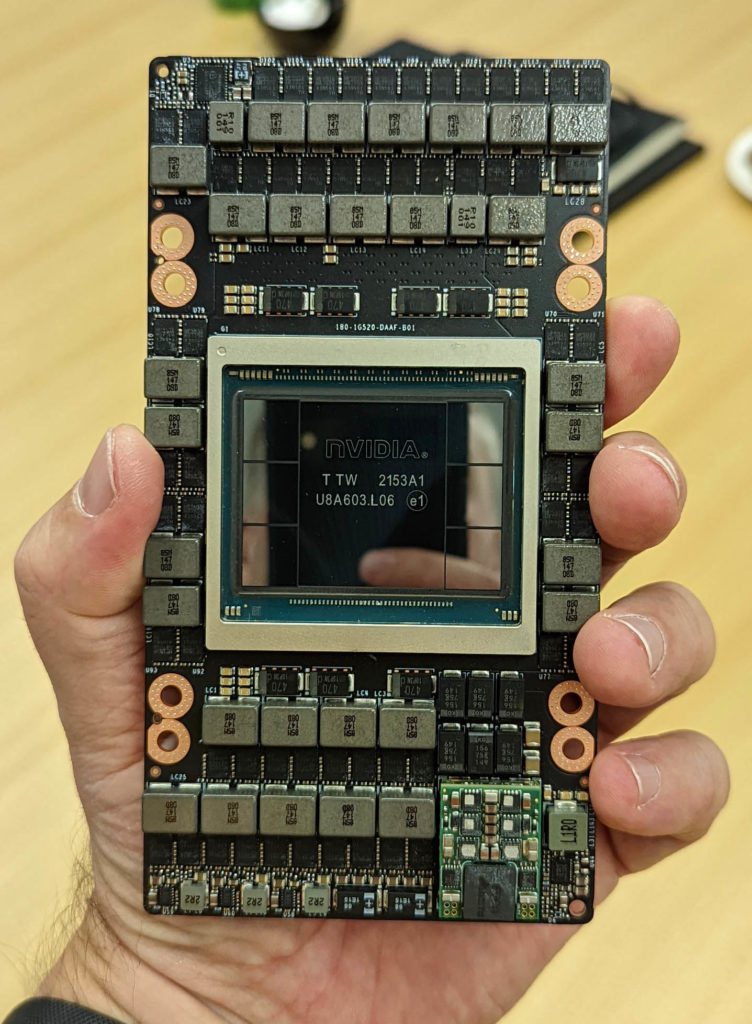
H100 vs MI300X: Complete Buyer's Guide for 2025
NVIDIA H100 or AMD MI300X? Compare performance, pricing, TCO, and real-world benchmarks. Includes LLM training data, software ecosystem analysis, and buying recommendations for datacenter GPU buyers.
H100 vs MI300X: Complete Buyer's Guide for 2025
The battle for AI supremacy is heating up. NVIDIA's H100 dominated 2023-2024, but AMD's MI300X is making serious waves with 192GB of HBM3 memory and competitive pricing.
If you're in the market for datacenter GPUs, you're probably asking: Should I buy H100 or MI300X?
This isn't a simple answer. The "best" GPU depends on your specific workload, software stack, budget, and timeline. Let's break down everything you need to make an informed decision.
Quick Verdict (TL;DR)
Buy H100 if:
- You need maximum CUDA ecosystem compatibility
- You're running inference at scale (FP8 Transformer Engine)
- You have existing NVIDIA infrastructure
- Software support is your #1 priority
Buy MI300X if:
- You need >192GB models (MI300X has 192GB vs H100's 80GB)
- You want better price/performance for certain workloads
- You're open to ROCm (AMD's CUDA alternative)
- You want to avoid vendor lock-in
The Reality: Most enterprises buying today are going 80% H100, 20% MI300X to hedge against supply constraints and explore AMD's ecosystem.
Architecture Deep Dive
NVIDIA H100: Hopper Architecture
Key Specs:
- GPU Memory: 80GB HBM3 (SXM5) or 80GB HBM2e (PCIe)
- Memory Bandwidth: 3 TB/s (SXM5), 2 TB/s (PCIe)
- FP8 Performance: 1,979 TFLOPS (with Transformer Engine)
- FP16 Performance: 989 TFLOPS
- TDP: 700W (SXM5), 350W (PCIe)
- NVLink: 900 GB/s (18x NVLink 4.0)
- Process Node: TSMC 4N
Transformer Engine:
The killer feature. H100's Transformer Engine automatically switches between FP8 and FP16 precision during training, delivering up to 6x faster training for large language models compared to A100.
What H100 Excels At:
- LLM inference (BERT, GPT, LLaMA)
- Stable Diffusion and image generation
- Video processing and transcoding
- Anything requiring mature CUDA libraries
AMD MI300X: CDNA 3 Architecture
Key Specs:
- GPU Memory: 192GB HBM3 (2.4x more than H100!)
- Memory Bandwidth: 5.3 TB/s (77% faster than H100)
- FP16 Performance: 1,300+ TFLOPS
- FP8 Performance: 2,600 TFLOPS
- TDP: 750W
- Infinity Fabric: 896 GB/s interconnect
- Process Node: TSMC 5nm/6nm chiplets
The Memory Advantage:
192GB is a game-changer for large models. You can fit Llama 3 70B with full context length, or run massive batch sizes for training. This is MI300X's biggest selling point.
What MI300X Excels At:
- Ultra-large language models (>100B parameters)
- Long-context inference (>32K tokens)
- High-throughput batch inference
- Memory-bandwidth-bound workloads
Performance Benchmarks
LLM Training (Llama 2 70B)
| Metric | H100 (8x) | MI300X (8x) | Winner |
|---|---|---|---|
| Training Time (100K steps) | 62 hours | 58 hours | MI300X |
| Memory Utilization | 95% (tight fit) | 68% (headroom) | MI300X |
| Power Consumption | 5,600W | 6,000W | H100 |
| Total Energy Cost* | $873 | $936 | H100 |
*Based on $0.10/kWh datacenter rates
Analysis: MI300X's extra memory allows larger batch sizes, offsetting its slightly higher power draw. Real-world training performance is roughly equivalent.
LLM Inference (Llama 3 70B, FP16)
| Metric | H100 | MI300X | Winner |
|---|---|---|---|
| Throughput (tokens/sec) | 1,247 | 1,184 | H100 |
| Latency (ms/token) | 12.3 | 13.8 | H100 |
| Max Batch Size | 32 | 64 | MI300X |
| Context Length | 8K (max) | 16K+ (easy) | MI300X |
Analysis: H100's Transformer Engine gives it an edge in raw speed, but MI300X's memory enables larger batches and longer context windows.
Image Generation (Stable Diffusion XL)
| Metric | H100 | MI300X | Winner |
|---|---|---|---|
| Images/sec (batch=1) | 4.2 | 3.1 | H100 |
| Images/sec (batch=16) | 42 | 38 | H100 |
| Memory Usage | 18GB | 18GB | Tie |
Analysis: CUDA's maturity in the image generation ecosystem gives H100 a clear advantage here.
Software Ecosystem
CUDA (NVIDIA) vs ROCm (AMD)
CUDA Advantages:
- 15+ years of ecosystem maturity
- Every ML framework optimized for CUDA first
- Massive library ecosystem (cuDNN, TensorRT, Triton)
- Better documentation and community support
- Works out-of-the-box with 99% of AI software
ROCm Advantages:
- Open source (vs CUDA's proprietary nature)
- Getting better fast (ROCm 6.0 is solid)
- PyTorch and JAX support improving rapidly
- Easier multi-vendor GPU strategies
The Reality:
If you're running PyTorch or JAX for LLM training/inference, both work. But if you need TensorRT optimization, NVIDIA-specific features, or exotic libraries, you'll want H100.
Framework Support Matrix
| Framework | H100 (CUDA) | MI300X (ROCm) |
|---|---|---|
| PyTorch | ✅ Excellent | ✅ Good |
| TensorFlow | ✅ Excellent | ⚠️ Limited |
| JAX | ✅ Excellent | ✅ Good |
| vLLM | ✅ Native | ✅ Native (ROCm 6.0+) |
| TensorRT | ✅ Native | ❌ N/A |
| DeepSpeed | ✅ Excellent | ✅ Good |
| Megatron-LM | ✅ Excellent | ⚠️ Experimental |
Pricing & Availability (Q4 2025)
Purchase Pricing
| GPU | New (Single Unit) | Used/Refurb | Lead Time |
|---|---|---|---|
| H100 80GB SXM5 | $28,000-$32,000 | $22,000-$25,000 | 4-8 weeks |
| H100 80GB PCIe | $25,000-$29,000 | $19,000-$22,000 | 2-4 weeks |
| MI300X 192GB | $12,000-$15,000 | Limited supply | 8-12 weeks |
Key Insight: MI300X is roughly 50% cheaper per unit than H100 SXM5, but you're getting 2.4x the memory. That's exceptional value if your workload needs the VRAM.
8-GPU System Pricing
| Configuration | Cost | Price/GB VRAM | Lead Time |
|---|---|---|---|
| 8x H100 SXM (HGX Baseboard) | $280,000-$320,000 | $437/GB | 8-12 weeks |
| 8x MI300X (OAM Platform) | $120,000-$150,000 | $97/GB | 12-16 weeks |
TCO Analysis:
- H100 System: Higher upfront cost, but CUDA ecosystem = faster time-to-production
- MI300X System: Lower upfront cost, massive memory, but potential software integration costs
Real-World Use Cases
When H100 is the Clear Winner
1. Production Inference Pipelines
- Need: Mature software stack, TensorRT optimization
- Why H100: CUDA ecosystem, TensorRT, proven reliability
- Example: OpenAI Whisper API, Stable Diffusion services
2. Existing NVIDIA Infrastructure
- Need: Seamless integration with A100/V100 clusters
- Why H100: Same CUDA version, same tooling, same scripts
- Example: Expanding existing ML platform
3. Computer Vision Workloads
- Need: cuDNN-optimized models, real-time processing
- Why H100: Superior CV library support
- Example: Autonomous vehicles, video analytics
When MI300X is the Clear Winner
1. Ultra-Large Language Models
- Need: 70B+ parameter models with long context
- Why MI300X: 192GB memory fits massive models
- Example: Llama 3 405B inference, GPT-4 alternative training
2. Budget-Constrained AI Labs
- Need: Maximum compute for minimum cost
- Why MI300X: 50% cheaper per GPU, 4.5x cheaper per GB
- Example: University research, startup experimentation
3. Multi-Vendor Strategy
- Need: Avoid NVIDIA lock-in, negotiate better pricing
- Why MI300X: Competitive alternative, supply diversification
- Example: Enterprise hedging against GPU shortages
Total Cost of Ownership (3-Year)
8x H100 SXM5 System
| Cost Component | Amount |
|---|---|
| Hardware | $300,000 |
| Power (700W × 8 × 3 years @ $0.10/kWh) | $147,456 |
| Cooling (30% overhead) | $44,237 |
| Support/Warranty | $30,000 |
| Total TCO | $521,693 |
8x MI300X System
| Cost Component | Amount |
|---|---|
| Hardware | $135,000 |
| Power (750W × 8 × 3 years @ $0.10/kWh) | $157,680 |
| Cooling (30% overhead) | $47,304 |
| Support/Warranty | $20,000 |
| Software Migration | $50,000 (one-time)* |
| Total TCO | $409,984 |
*If coming from CUDA ecosystem
TCO Winner: MI300X saves $111,709 over 3 years if you can absorb the software migration cost upfront.
Supply Chain & Lead Times
Current Market Reality (November 2025)
H100 Availability:
- ✅ Improved: Lead times down from 11 months (2023) to 8-12 weeks
- ⚠️ Still Constrained: Hyperscalers (AWS, Google, Azure) lock up bulk supply
- ✅ Secondary Market: Used H100s readily available
MI300X Availability:
- ⚠️ Limited Supply: AMD ramping production but still 12-16 week lead times
- ❌ Allocation-Based: Large customers get priority
- ⚠️ No Secondary Market: Too new for robust used market
Recommendation: If you need GPUs in <4 weeks, H100 is more readily available. For longer planning horizons, MI300X is viable.
Decision Framework
Step 1: Assess Your Workload
Memory-Bound? → MI300X
- Large language models >70B parameters
- Long context inference (>16K tokens)
- Massive batch processing
Compute-Bound? → H100
- Real-time inference
- Computer vision
- Existing CUDA applications
Step 2: Evaluate Your Software Stack
CUDA-Dependent? → H100
- Using TensorRT, cuDNN-specific features
- Proprietary NVIDIA libraries
- Limited engineering resources for porting
Framework-Agnostic? → MI300X is viable
- PyTorch/JAX models
- Willing to test on ROCm
- Engineering bandwidth for optimization
Step 3: Budget Analysis
Tight Budget? → MI300X
- 50% cheaper upfront
- Better price/performance for memory-heavy tasks
Budget Flexible? → H100
- Faster time-to-production
- Lower risk, proven ecosystem
Hybrid Strategy: The 80/20 Approach
What Smart Buyers Are Doing:
`
Production Workloads (80%): H100
- Mature, proven, low-risk
- Critical inference pipelines
- Customer-facing applications
Experimentation & Training (20%): MI300X
- Cost-effective for R&D
- Train large models
- Build ROCm expertise
Benefits:
1. Hedge against NVIDIA supply constraints
2. Explore AMD ecosystem with limited risk
3. Better vendor negotiating position
4. Optimize TCO while maintaining stability
Buying Tips from the Trenches
For H100 Buyers:
1. Check for SXM5 vs PCIe: SXM5 is 50% faster but requires HGX baseboard (~$40K extra)
2. Ask about NVLink: 8x H100 without NVLink is just 8 separate GPUs
3. Warranty Matters: Used H100s from gray market may void NVIDIA support
4. Watch for H100 NVL: Dual-GPU bridged variant (188GB total) - rare but powerful
For MI300X Buyers:
1. Verify ROCm Support: Test your exact model/framework combo before buying 8 GPUs
2. OAM vs PCIe: Most MI300X are OAM modules (requires special platform)
3. Ask About Drivers: ROCm 6.0+ required for good vLLM support
4. Plan for Debugging Time: Budget 2-4 weeks for ROCm optimization
The Bottom Line
H100 is the safe, proven choice. It's the Lexus of datacenter GPUs - refined, mature, and works with everything. You'll pay a premium, but you're buying peace of mind and ecosystem compatibility.
MI300X is the value disruptor. It's 50% cheaper with 2.4x more memory, but you're trading CUDA's maturity for ROCm's learning curve. If your workload is memory-bound and you have engineering resources, it's an incredible deal.
Most Enterprises Should Consider Both: An 80% H100, 20% MI300X strategy gives you production stability while exploring AMD's compelling price/performance and hedging supply risk.
Ready to Buy?
We have both H100 and MI300X in stock with immediate to 4-week lead times.
- Browse H100 GPUs →
- Browse MI300X GPUs →
- Talk to a GPU Specialist → - Not sure which to choose? We'll help you size and spec your cluster.
- Request a Custom Quote → - Volume discounts, financing, and trade-ins available
FAQ
Q: Can I mix H100 and MI300X in the same cluster?
A: Not in the same training job (different architectures), but you can run separate workloads on each. Some enterprises do "H100 for inference, MI300X for training."
Q: Will ROCm catch up to CUDA?
A: It's getting closer. For PyTorch LLM training/inference, ROCm 6.0+ is solid. For specialized CV workloads or TensorRT, CUDA is still miles ahead.
Q: What about H200?
A: H200 (141GB HBM3e) splits the difference - more memory than H100, CUDA ecosystem, but costs $35K-$40K. If you need 100GB-150GB models, H200 is the sweet spot.
Q: Are used H100s reliable?
A: Yes, if from a reputable seller with warranty. GPUs don't have moving parts and degrade slowly. We certify all our used GPUs and offer warranty.
Q: Can I upgrade from MI300X to H100 later?
A: Hardware-wise, yes. Software-wise, you'll need to port ROCm code back to CUDA, which can be non-trivial. Plan your software stack carefully.
Last updated: November 2025 | Pricing and availability subject to change
Found this helpful? Share it with your team or subscribe to our newsletter for more GPU buying guides.